• Welcome to the BMW R18 Forums. Member registration disables ads and allows you to post and share. Register Here.

Information Bagger/TC Carpuride 702 install

  • <i class="fa--xf fal fa-check "><svg xmlns="http://www.w3.org/2000/svg" role="img" aria-hidden="true" ><use href="/data/local/icons/light.svg?v=1758297946#check"></use></svg></i> Discussion starter Discussion starter Onequickwrench
  • Start date Start date

Onequickwrench

New member
Joined
Sep 8, 2025
Messages
14
Location
RDU
Visit site
Bike
2023 R18 Bagger, 1992 BMW K1, 2004 BMW F650GS Dakar
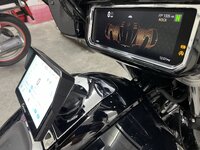
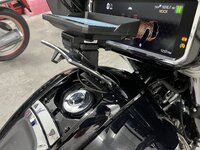
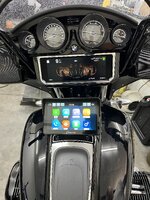
I used the BMW Accessory Nav mount and a leftover Nav cradle I had laying around.

Pretty straightforward install, but it’s not for the faint of heart as you’re drilling holes in your gas cap cover panel.IMG_4188.jpeg

IMG_4189.jpeg


IMG_4190.jpeg

IMG_4191.jpeg
 
Yes.
Two small holes for the mounting bolts and one larger hole for the power cable to pass through
 
Thank you for the info. The position of mounting on the photos seems too high for me. Kind of defocusing from the road.
Interesting. From the pictures it looks like your mount requires you to look down taking your eyes off the road and the Motorrad Audio seems to be in the right place. But, what do I know, I don’t have either. I don’t use the bike to tour so I’m good with the phone/Navi.
 
Actually the pictures make it look like it might block your view. In reality you look right over it as your head is much higher than the GPS. As fleabag says it is in a much more natural position to look at it while riding and you don't have to take your eyes off the road to look down at it. It also comes with a slick wiring harness splitter that plugs into the back of the aux power port inside the fairing. No exposed wiring makes the installation very clean.
 
Back
Top