

• Welcome to the BMW R18 Forums. Member registration disables ads and allows you to post and share. Register Here.

Connected App Volume

  • <i class="fa--xf fal fa-check "><svg xmlns="http://www.w3.org/2000/svg" role="img" aria-hidden="true" ><use href="/data/local/icons/light.svg?v=1789222567#check"></use></svg></i> Discussion starter Discussion starter Decodave
  • Start date Start date

Decodave

Member
Joined
Jul 30, 2023
Messages
32
Location
Glasgow UK
Visit site
Bike
R18 Transcontinental
Hi Folks so for the first time yesterday I connected my Schuberth C5 and SC2
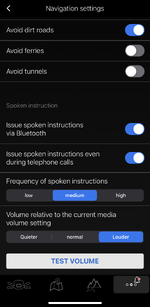
to my R18 TC Via. I got music in the helmet fine but the Sat Nav instructions from the BMW App were very quiet behind the music. Obviously if turned up the Nav it also turned up the music. I know there is a setting in the BMW for Nav and I had this turned to high (see photo) but is there way to further increase sat nav on Iphone 13 via the app to be louder than music ?
 

Attachments

  • IMG_2659.webp
    IMG_2659.webp
    291.5 KB · Views: 14
I don't know which app you use to listen to the music, but sometimes they have a separate volume control where you can turn the music itself down compared to the volume setting in the phone to balance it out.
 
I don't know which app you use to listen to the music, but sometimes they have a separate volume control where you can turn the music itself down compared to the volume setting in the phone to balance it out.
Thanks Tmas, in my case I am using the standard Apple Music App. I have tried going into the BMW app and using the phone buttons setting the volume to full while on the highest volume button on the app. I have then gone into Apple Music and tried turning the music volume down using the phone buttons but this seems to turn everything down. I can’t find anywhere to be able to balance the volumes or any app which will let you. You can change the overall volume and the tone etc but nothing that lets you balance music sources. Not sure about Android.
 
Back
Top