

- Joined
- Jul 7, 2022
- Messages
- 490
- Location
- Maryland
- Bike
- 2022 R18 Transcontinental, 2004 r1150RT, 2003 R1200CL
Finally figured out how to enable/disable ACC on Alcina (2022 R18 Transcontinental).
I actually stumbled on this while reviewing BIMMER, not beemer, tips. In bimmers, one can enable/disable the system by HOLDING the follow distance button for three seconds. I wondered if the same was true for Alcina. I looked at my user's manual (page 56) and, while it "sorta" mentions holding the button, it could be very easy to overlook what BMW was trying to say, as IMO, the authors weren't particularly explicit in what they were trying to convey.
So, here's what to do:
Step one:
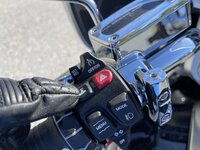
Hold this button for THREE seconds...
Step two:
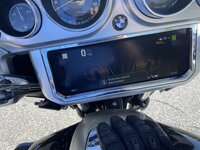
The screen will report "Distance control deactivated."
To enable, hold the same button again for three seconds again...
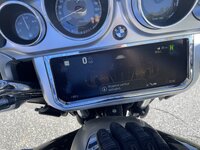
And, ACC will re-activate.
That's literally it. Hopefully this helps out other riders who simply want the old-fashioned cruise control active.
Mike
I actually stumbled on this while reviewing BIMMER, not beemer, tips. In bimmers, one can enable/disable the system by HOLDING the follow distance button for three seconds. I wondered if the same was true for Alcina. I looked at my user's manual (page 56) and, while it "sorta"
mentions holding the button, it could be very easy to overlook what BMW was trying to say, as IMO, the authors weren't particularly explicit in what they were trying to convey.So, here's what to do:
Step one:
Hold this button for THREE seconds...
Step two:
The screen will report "Distance control deactivated."
To enable, hold the same button again for three seconds again...
And, ACC will re-activate.
That's literally it. Hopefully this helps out other riders who simply want the old-fashioned cruise control active.
Mike