• Welcome to the BMW R18 Forums. Member registration disables ads and allows you to post and share. Register Here.

No maps after phone call

  • <i class="fa--xf fal fa-check "><svg xmlns="http://www.w3.org/2000/svg" role="img" aria-hidden="true" ><use href="/data/local/icons/light.svg?v=1768230793#check"></use></svg></i> Discussion starter Discussion starter fleabag
  • Start date Start date

fleabag

Active member
Joined
Dec 5, 2022
Messages
330
Visit site
Bike
R 18B
I’m not one to make many calls while riding, but… I noticed that after a phone call, the maps are no longer displayed. (WiFi disconnects). No way to get the map displayed again without pulling over and getting map mode on the Connected app re-connected. Lame.

Just me?
 
Yup, had the issue yesterday and had to shut the bike, helmet and phone down to reboot the wi-fi.

Any solutions known?
 
It's due back today, but before it went in I was told that all updates were installed already.
 
I used to do the following... with a now new issue or extra attention needed:

1. Start up one of the two music apps I was going to use for my ride (YT music or Prime); which both, make-up a downloaded playlist.

2. Enable the "Do Not Disturb" function on my phone; I don't want to take calls and or respond to text messages while riding.... and or having my music interrupted...

3. Start up the BMW Connected mobile app

4. Start up the Bike

5. Start music, selecting play within the Media Menu

6. Start Navigation within the Navigation menu

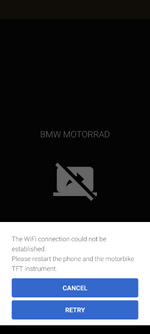
The five above steps always worked well for me; now, after installing the latest version of the BMW Connect App, I found that the "Screen Casting" function for displaying the Navigation maps doesn't load up immediately. I now need to close the mobile app and re-open it until I get the "Retry" option and then it appears to work all day...

NOTE: I tried using the Navigation function on my way to work on the bike this morning (Thursday, June 20); a huge FAILURE, I didn't realize it was so buggy...!! The actual map and navigation function was frozen..

I'll try again on my way home from work...

Screenshot_20240620-061641.png
 
Last edited:
It's due back today, but before it went in I was told that all updates were installed already.
New software for the bike installed, a flaking manifold replaced ( :oops: ) and a new front tyre. No faults found on the bike and no TFT/connectivity issues could be replicated. I guess we'll just have to wait and see what happens.
 
New software for the bike installed, a flaking manifold replaced ( :oops: ) and a new front tyre. No faults found on the bike and no TFT/connectivity issues could be replicated. I guess we'll just have to wait and see what happens.
Start the navigation and then have someone call the phone. Let us know if your map disconnects.
 
Mate, it only happend once in the 3 months I've had it. It's almost certain that it will NOT drop out. In any case, the dealer was unable to finish my bike tonight and I'll get it back tomorrow now.
 
Mate, it only happend once in the 3 months I've had it. It's almost certain that it will NOT drop out. In any case, the dealer was unable to finish my bike tonight and I'll get it back tomorrow now.
Are you saying that in those three months, you had multiple calls to your phone with an active map on the TFT, and it only disconnected from the map once?
 
Yes and two occasions where it simply stopped communicating with phone when not on a call.
 
I used to do the following... with a now new issue or extra attention needed:

1. Start up one of the two music apps I was going to use for my ride (YT music or Prime); which both, make-up a downloaded playlist.

2. Enable the "Do Not Disturb" function on my phone; I don't want to take calls and or respond to text messages while riding.... and or having my music interrupted...

3. Start up the BMW Connected mobile app

4. Start up the Bike

5. Start music, selecting play within the Media Menu

6. Start Navigation within the Navigation menu

The five above steps always worked well for me; now, after installing the latest version of the BMW Connect App, I found that the "Screen Casting" function for displaying the Navigation maps doesn't load up immediately. I now need to close the mobile app and re-open it until I get the "Retry" option and then it appears to work all day...

NOTE: I tried using the Navigation function on my way to work on the bike this morning (Thursday, June 20); a huge FAILURE, I didn't realize it was so buggy...!! The actual map and navigation function was frozen..

I'll try again on my way home from work...

View attachment 15002

My test ride home was much better NAVIGATION wise; however, I still had to hit the "RETRY" in order for the map to be displayed..
 
My test ride home was much better NAVIGATION wise; however, I still had to hit the "RETRY" in order for the map to be displayed..
One of these days they will get it ironed out. I do think it’s lame to have to use my phone for this.
 
Mate, it only happend once in the 3 months I've had it. It's almost certain that it will NOT drop out. In any case, the dealer was unable to finish my bike tonight and I'll get it back tomorrow now.
I found the map function to be more than dangerous. Yes, it switches after a phone call, yes, it does so randomly. But worse, the navigation is unbelievably clunky and very distracting. Icons don’t scale, streets are barely visible; little contrast between your route and the rest. Can’t even use the map as a general reference while using your phone for the detail.. it is one or the other…(even thought of dedicating a phone just for the navigation, a tiny one for the otherwise useless holder on top of the tank….(only fits smaller models of phones without case…BMW, do you really think any customer that can afford a TC is going to walk around with an economy mobile phone, in the US market???? Any three year old could have clarified that for you!!) …but there is no way to manage your music if you do that, stuck in the same playlist forever as multiple playlists don’t exist in the BMW universe). Better to keep your phone at eye level with Waze or Maps and use the magnificent big screen to keep you informed on tire pressures… outside of there there is little use for it. (BMW. Please please please improve the software or allow Apple Play like you do with your cars)
 
Back
Top